
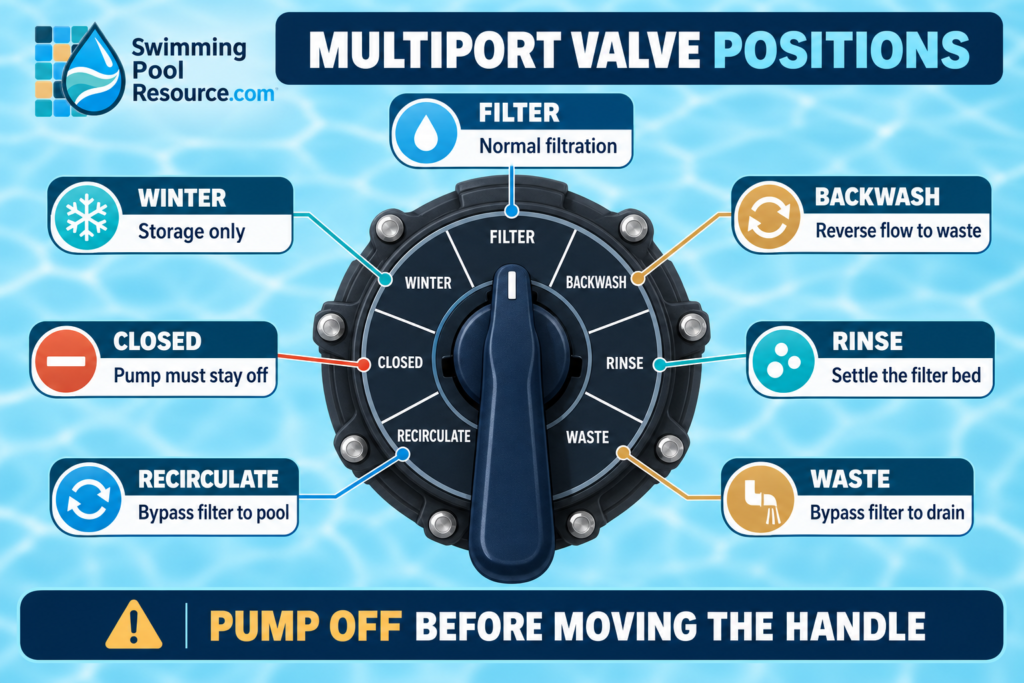
Pool multiport valve positions control where water travels through the filter system. On a typical valve, Filter is the normal setting; Backwash reverses flow to clean the filter; Rinse resets the flow path after backwashing; Waste sends water to the discharge line without filtering it; Recirculate returns water to the pool without filtering it; Closed blocks flow; and Winter leaves the valve passages open for drained seasonal storage.
Your exact valve may have six positions, seven positions, different wording, or a different flow path. Read the valve label and the manuals for the specific valve and filter before operating it.
The rule that prevents the most damage: Turn the pump off and prevent an automatic restart before moving a multiport-valve handle. Never start the pump with the valve in Closed. Never open or service a pressurized filter.
Pool multiport valve positions at a glance
| Valve position | What it usually does | Common use | Important caution |
|---|---|---|---|
| Filter | Sends water through the filter media and back to the pool | Normal circulation and filtration | Use the normal startup and air-relief procedure for the exact filter |
| Backwash | Reverses flow through the filter and sends water to waste | Cleaning compatible sand and D.E. filters | Prepare the waste line first; the pump must be off before selecting it |
| Rinse | Sends water through the filter in the normal direction, then to waste | Clearing the valve and resettling a sand bed after backwash | Pump off before changing from Backwash to Rinse or Rinse to Filter |
| Waste / Drain | Bypasses the filter and sends water out the waste line | Lowering water or vacuuming fine debris to waste | Watch the water level; the pool can drain quickly |
| Recirculate | Bypasses the filter and returns water to the pool | Temporary circulation when filtration is intentionally bypassed | Water is circulating but is not being filtered |
| Closed | Blocks circulation through the valve | Model-specific service or isolation with the system off | Never run the pump in Closed |
| Winter / Winterize | Leaves valve passages open or the diverter disengaged for storage | A drained, properly winterized system | Not a running position; winterization is equipment- and climate-specific |
Not every multiport valve has every position. A six-way valve may omit a separate Winter position, and some D.E. systems use a flow path that differs from a sand filter. Do not copy a neighboring pool’s handle direction—the printed labels on your valve and the official manual control.
1. Filter: the normal operating position
Filter is the everyday setting on a compatible sand or D.E. system. Water travels from the pump, through the filter media, and back to the pool. This is also the position commonly used when vacuuming through the filter.
Use Filter for normal scheduled circulation, skimming, sanitation, and heating unless a connected-equipment manual says otherwise. After cleaning or backwashing, record the clean-filter pressure at the same pump speed and valve configuration. That number gives you a useful baseline for future service.
If the return flow is weak in Filter, do not assume the handle should be moved. Check water level, baskets, pump prime, valve alignment, and pressure first. The low-pool-flow guide walks through those checks in order.
2. Backwash: reverse flow to clean the filter
Backwash reverses water through compatible filter media and sends the loosened debris out the waste line. It is commonly used on sand filters and on some D.E. filters with the correct valve and recharge procedure. Cartridge filters normally do not use Backwash.
Backwash is not a substitute for diagnosing every pressure or water-quality problem. Service the filter according to its manual and its clean-pressure baseline. Manufacturer recommendations vary: even official manuals give different pressure-rise and run-time guidance for different filters. Your exact equipment instructions take priority over a universal number.
Before starting a backwash cycle:
- Confirm that the filter and valve are designed for backwashing.
- Direct the waste line to a legal, safe discharge location.
- Unroll and secure a backwash hose, if used, so it cannot kink or whip.
- Turn the pump off and disable schedules or automation that could restart it.
- Wait for the pump to stop completely, then press the handle fully and select Backwash.
- Follow the filter manual’s air-relief and startup procedure while standing clear of the tank.
Backwashing can release a large amount of water. Follow local discharge rules and never send chlorinated water where it can flood property, erode soil, or enter a prohibited drain.
3. Rinse: finish the backwash cycle
Rinse sends water through the filter in the normal direction but routes it to waste. On a sand filter, this helps settle the sand bed and clears residual debris from the valve and plumbing before water returns to the pool.
Rinse is not the same as Filter. Leaving the valve in Rinse sends pool water out the waste line.
A safe sequence is:
- Complete the backwash step according to the manual.
- Turn the pump off and wait for it to stop.
- Move the valve from Backwash to Rinse.
- Run Rinse for the time specified by the filter manufacturer.
- Turn the pump off again.
- Return the handle to Filter.
- Restart by the filter manual, check for leaks, and note the pressure.
Do not use one brand’s timing for every filter. Current Jandy sand-filter instructions, for example, specify a longer Rinse interval than some Pentair guidance. That difference is exactly why the model label and manual matter.
4. Waste or Drain: bypass the filter and discharge water
Waste, sometimes labeled Drain, sends pump water directly to the waste line without passing it through the filter. Common uses include lowering an overfilled pool and vacuuming a small amount of fine debris that would otherwise load or pass through the filter.
Waste can lower the water level faster than expected. Watch the pool continuously, stop before the skimmer draws air, and never allow the pump to run dry. Confirm where the discharge goes before starting. If you are vacuuming, use the manual pool-vacuum guide and verify that your plumbing supports vacuum-to-waste operation.
Waste is not a normal filtration setting. Water sent out this line does not return to the pool.
5. Recirculate: return water without filtering it
Recirculate bypasses the filter media but returns water to the pool. This can preserve circulation temporarily when the filter must be intentionally bypassed or when a product label and equipment manual specifically call for it.
Recirculate does not remove particles. A cloudy pool may look no better—and can become worse—if the system stays in this position because the filter is not capturing suspended debris. Restore filtration as soon as the underlying reason for bypassing the filter is resolved.
Do not use Recirculate to hide a cracked tank, unsafe closure, pressurized leak, or other equipment hazard. Shut the system down and obtain qualified service when the filter cannot be operated safely.
6. Closed: no circulation
Closed blocks the valve’s flow paths. It is not an operating position.
Never start the pump with the multiport valve in Closed. A blocked flow path can rapidly create unsafe pressure or damage the pump, plumbing, valve, filter, or connected equipment.
If a service procedure calls for Closed, the pump must remain off and protected from automatic restart. Valve position alone does not make a pressurized filter safe to open. Follow the full shutdown and pressure-relief procedure, confirm the gauge reads zero, and never loosen a clamp or lid when pressure may remain.
7. Winter: drained storage only
Some valves include a Winter or Winterize position. On supported models, it leaves the diverter disengaged or keeps passages open so residual water has room to expand after the filter and plumbing have been properly drained.
Winter is a storage position, not a circulation setting. Selecting it does not winterize the pool by itself. Climate, plumbing layout, freeze risk, filter type, pump, heater, sanitizer, and water features all affect the correct procedure. Follow the manuals and local guidance; hire a qualified pool professional when freeze damage is possible.
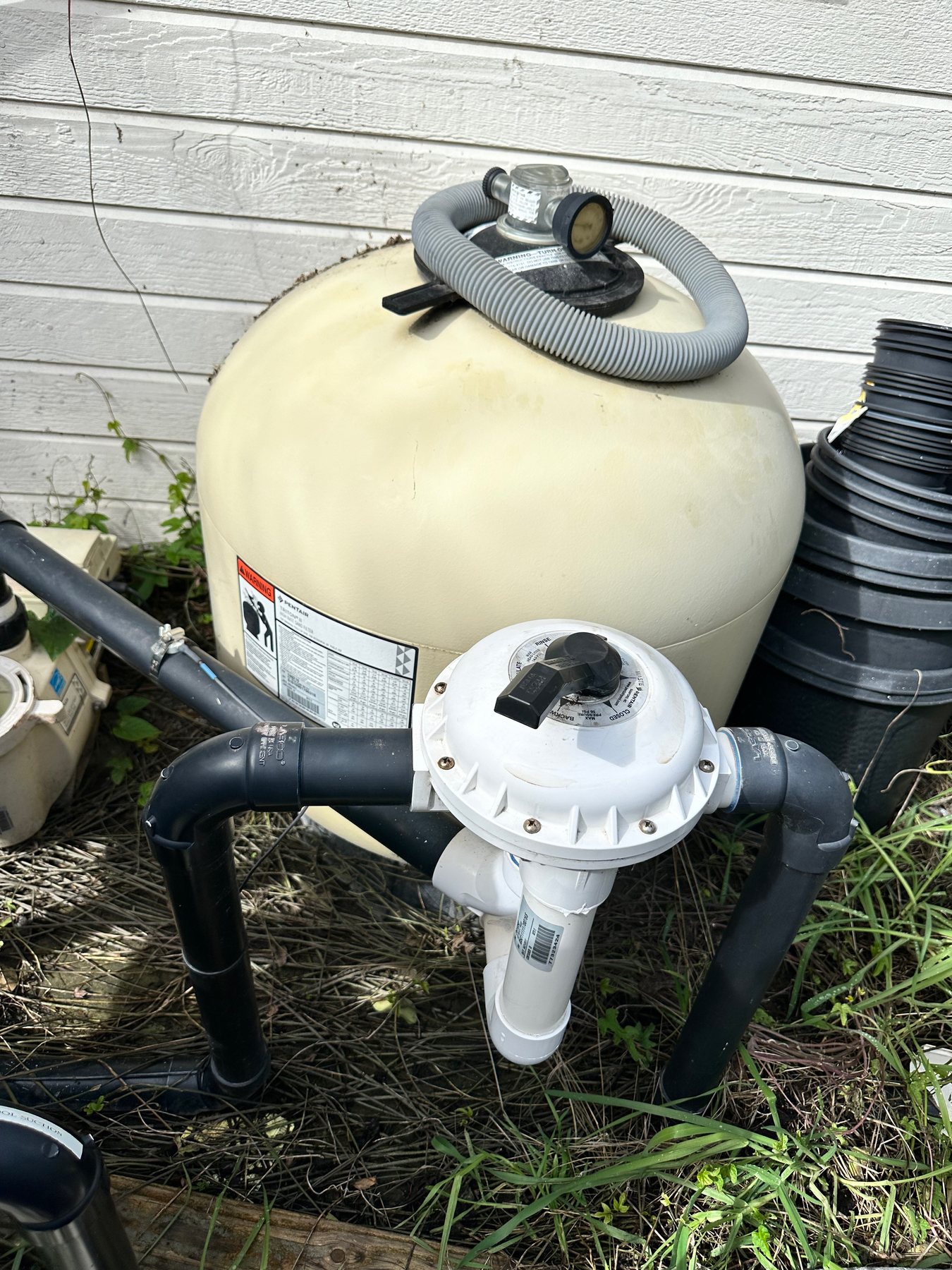
How to change a multiport-valve position safely
- Identify the valve and filter. Photograph their model labels and find the matching manuals.
- Stop the pump. Shut it off and disable timers, schedules, remote control, and freeze protection when the procedure requires it.
- Wait for complete stop. Do not move the handle while water is actively flowing through the valve.
- Prepare the selected path. Open or secure the waste line when using Backwash, Rinse, or Waste; confirm the pool level and discharge location.
- Press the handle down fully. Rotate only to a printed position. Do not stop between settings unless the manufacturer specifically identifies a storage position there.
- Release and confirm engagement. The handle should rise and lock into the selected detent. Do not force a stiff or damaged handle.
- Restart by the manual. Follow the filter’s air-relief procedure, stand clear of the tank, and check flow, pressure, and leaks.
If the label is unreadable, the handle is stuck, or the valve does not lock, leave the pump off. Guessing at an unlabeled flow path can discharge the pool, deadhead the system, or send debris back through the returns.
A model-specific backwash sequence
Use this as an orientation—not a replacement for the exact manual:
- Note the current pressure at the normal pump speed and verify that backwashing is actually due.
- Turn the pump off and prevent automatic restart.
- Prepare the waste line and select Backwash.
- Follow the manual’s air-relief and startup steps while standing clear.
- Backwash only until the manual’s completion condition is met, such as clear water in the sight glass.
- Turn the pump off.
- Select Rinse and run it for the specified interval.
- Turn the pump off again and return the valve to Filter.
- Restart safely, check the waste line has stopped flowing, and record the new clean pressure.
- For a D.E. filter, restore the exact approved media amount as the filter manual directs.
For a broader comparison of filter types, see Cartridge vs. Sand vs. D.E. Pool Filters. For service safety and cleaning differences, use How to Clean a Pool Filter and How to Understand Pool Filter Pressure.
Common multiport-valve problems
Water leaks from the waste line while filtering
A small continuous discharge in Filter can point to debris in the valve, a worn diverter seal or spider gasket, a damaged spring or key assembly, or a plumbing issue. Turn the pump off before inspecting anything external. Internal service is model-specific; never remove the valve top or loosen filter connections while the system is pressurized.
The handle is difficult to turn
Do not use a pipe or extra leverage. A stiff handle can indicate pressure, sand or debris in the valve, dry or damaged seals, corrosion, or a failing internal assembly. Shut the pump off, relieve pressure as the manual directs, and arrange service if the handle will not operate normally.
Debris returns to the pool after backwashing
Confirm that the system completed the required Rinse step and that the handle returned fully to Filter. Persistent debris can also involve damaged laterals, an incorrect sand level or media, a valve leak, or a filter assembly problem.
The label is faded or missing
Do not infer positions from a generic internet diagram. Find the valve model number and its official manual or replacement label. Different valves place functions in different locations.
Frequently asked questions
Which multiport-valve position should I use every day?
Use Filter for normal circulation and filtration unless the manual for your exact system directs otherwise.
Can I turn the multiport valve while the pump is running?
No. Turn the pump off and wait for it to stop before moving the handle. Manufacturer instructions consistently warn against changing the valve position while the pump operates.
What is the difference between Waste and Recirculate?
Both bypass the filter. Waste sends water out of the system through the discharge line; Recirculate sends water back to the pool.
What is the difference between Backwash and Rinse?
Backwash reverses flow through compatible filter media to remove trapped debris. Rinse sends water through the filter in the normal direction and then to waste to reset the sand bed and clear the valve before returning to Filter.
Can I vacuum with the valve in Filter?
Usually, yes, when the filter and vacuum setup are designed for it. Filter keeps the water in the circulation loop and captures debris in the media. Waste may be appropriate for a small amount of very fine debris, but it drains water and requires compatible plumbing.
Why does my valve have only six positions?
Valve designs differ. Some have six operating positions plus a separate winter detent; others omit Winter or use different labels. The exact model manual is the only reliable map.
The bottom line
Pool multiport valve positions are simple once you follow the water path: Filter returns filtered water, Backwash reverses flow to waste, Rinse finishes the cleaning cycle, Waste drains without filtering, Recirculate returns without filtering, Closed blocks flow, and Winter is for drained storage where provided.
The safe habit matters more than memorizing the dial: identify the exact equipment, turn the pump off before every position change, prepare the discharge path, and restart according to the filter manual. If the handle, label, tank, pressure gauge, or valve condition is questionable, leave the system off and get qualified help.
Chris Barnes is a former pool-service company owner with more than seven years of residential and commercial pool-service experience. Swimming Pool Resource turns field experience and manufacturer guidance into practical steps homeowners can use to troubleshoot, service, and maintain their pools.